

Accurate input data for corrosion risk evaluation
To evaluate corrosion risk, you need input parameters such as pH, CO₂ and H₂S fugacities, concentration of organic acids, salinity or chloride concentration etc. ScaleSim can calculate all these variables for you along the full well path.
Why we built ScaleSimMaterial?
Corrosion and materials decisions rely on a handful of inputs such as pH in the aqueous phase, chloride concentration, CO₂/H₂S fugacities in the system, and oxygen concentration whenever it sneaks in. Getting those numbers from water analysis reports, PVT data and production rates is not always straightforward. ScaleSim can calculate these parameters for you, but it requires access to a full ScaleSim model, you need need to know how to use it, not just the simple well-calculation module, but you will probably also want to tune the model to match H2S measuremtns.
ScaleSimMaterial streamlines that work. It runs on the full ScaleSim thermodynamic model, but with a simplified Excel user interface where required input data has been stripped down to a minimum (see below), and the necessary water and PVT tuning routines are run automatically.
ScaleSimMaterial also gives the user the opportunity to adjust H2S rate in the well stream to match gas phase analyses performed topside.
Input Data
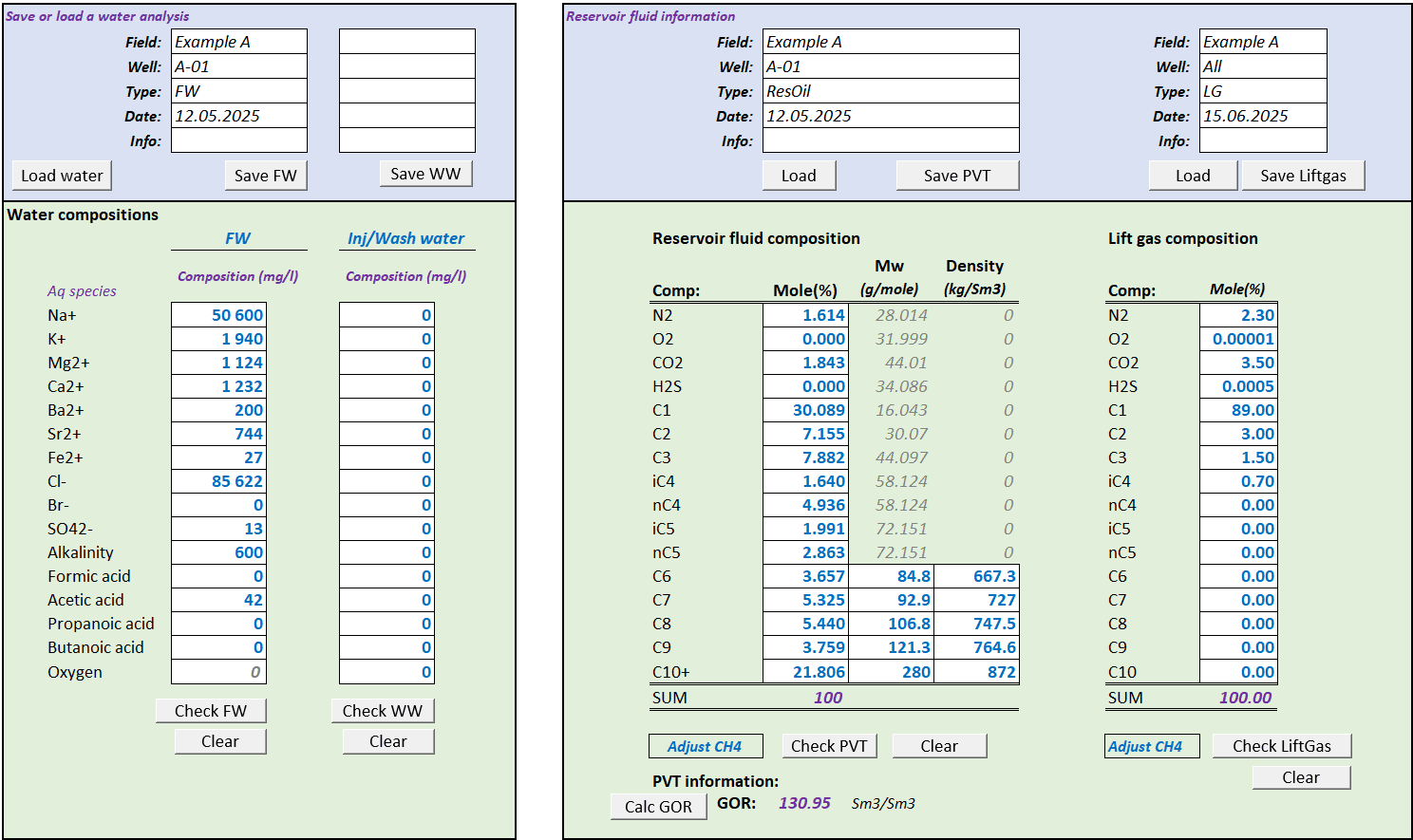
The required input has been simplified to a minimum and are shown below:
Composition of formation water and possible injection/wash water
Composition of reservoir fluid and possible lift gas
ScaleSimMaterial asks for the main ions like Na+, K+, Ca2+ etc., total alkalinity (often called bicarbonate in water analysis reports) and organic acids. Na+ or Cl- will be adjusted automatically to make the water electro neutral. Some wells can have water injection, and you can specify the full composition of this water, or leave it to freshwater. But you also have an option to add oxygen to this water and ScaleSim will then calculate the oxygen fugacity/partial pressure and concentration in the well.
The PVT input is the same as in ScaleSim and ensures that the oil and gas phases are modelled correctly. You can also add a lift gas when this is relevant. Oxygen an be added to the lift gas, this can be relevant for topside processes where there is gas recovery and this can result in some oxygen in the injection gas.
Simulation setup
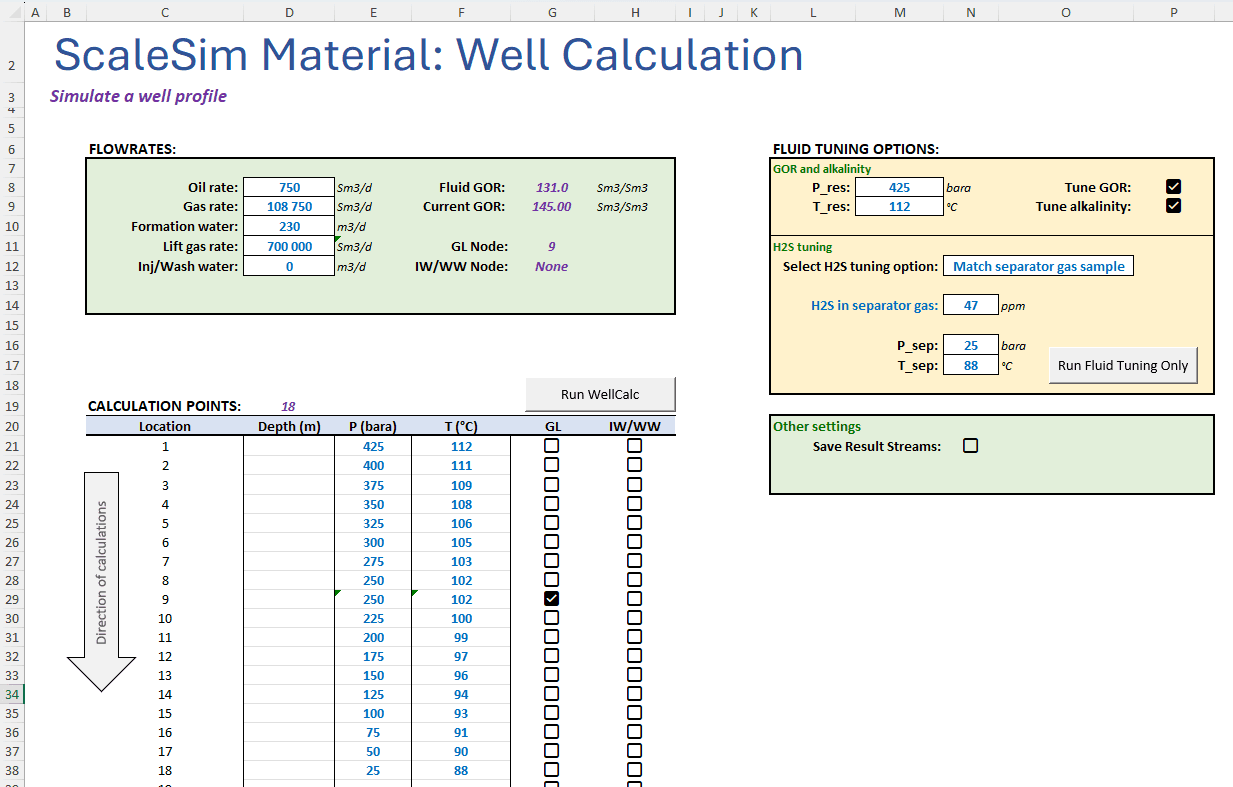
An example of required input data to model a well is shown below:
Flow rates of Oil, Gas and Formation water
Lift gas - if relevant
Wash water - if relevant
Pressures and temperatures along well trajectory. Depth can be added for information.
If the specified gas and oil rates gives a different GOR than the specified fluid, ScaleSimMaterial can automatically adjust the fluid to match GOR. When the simulation is run, ScaleSimMaterial will automatically:
Saturate the reservoir fluid with water at reservoir conditions
Equilibrate the water with the reservoir fluid and add dissolved gas
If user has selected it, adjust alkalinity to calcite saturation
Adjust H2S in well stream – see separate section below
ScaleSimMaterial will then perform a calculation at all calculation point where P and T are specified. When the gas lift injection point is reached, the lift gas is added to the wellstream.
Results
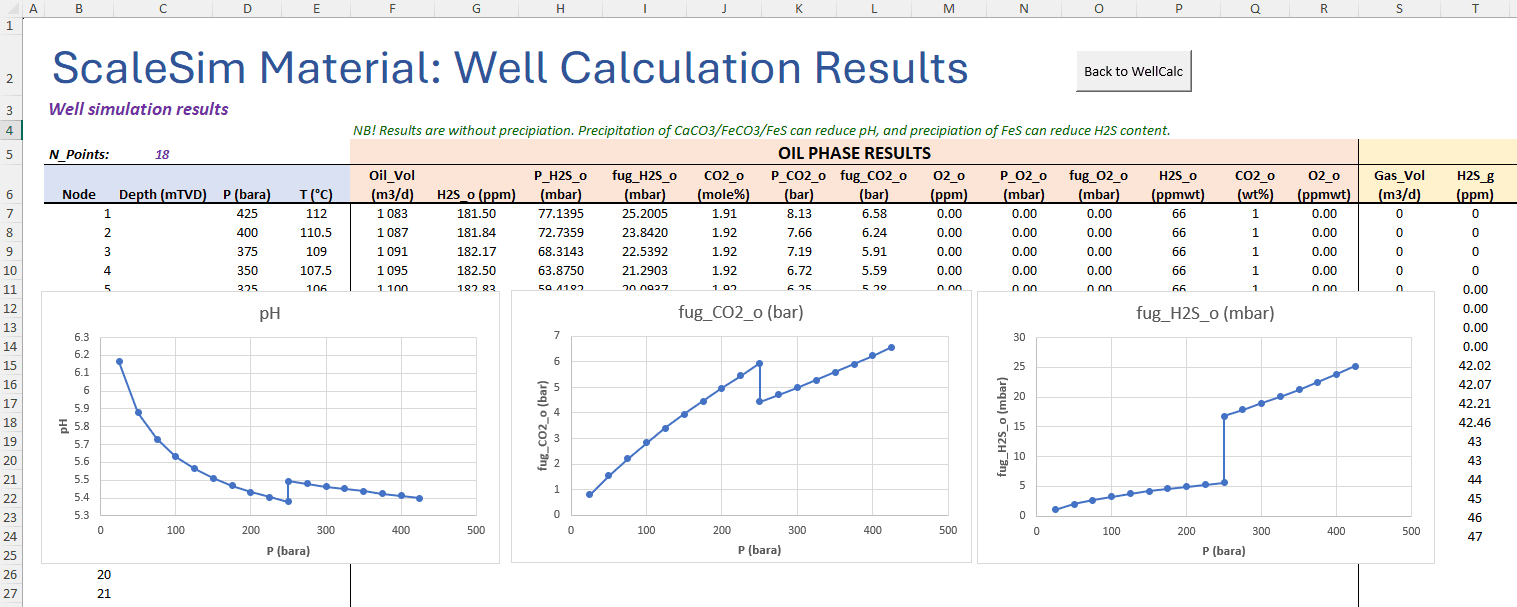
A calculation takes less than a second, and all results are shown in a separate worksheet. The picture below shows the first part showing results for the oil phase. The same data are also given for the gas and the water phase. For the water phase, you will also get information such as pH, chloride concentration, organic acids etc. There is also an automatic plotting section where you can easily generate plots. You may of course also generate you own plots, after all, this is Excel and all the Excel functionality is available!
The example below shows calculated pH versus pressure. The injected lift gas gives a sharp reduction in pH. Fugacity of CO2 and H2S are also shown. The fugacity is from the oil phase in this case because there is no gas phase present upstream the lift gas injection point. Remember that fugacity is always the same in all phases!
H2S tuning
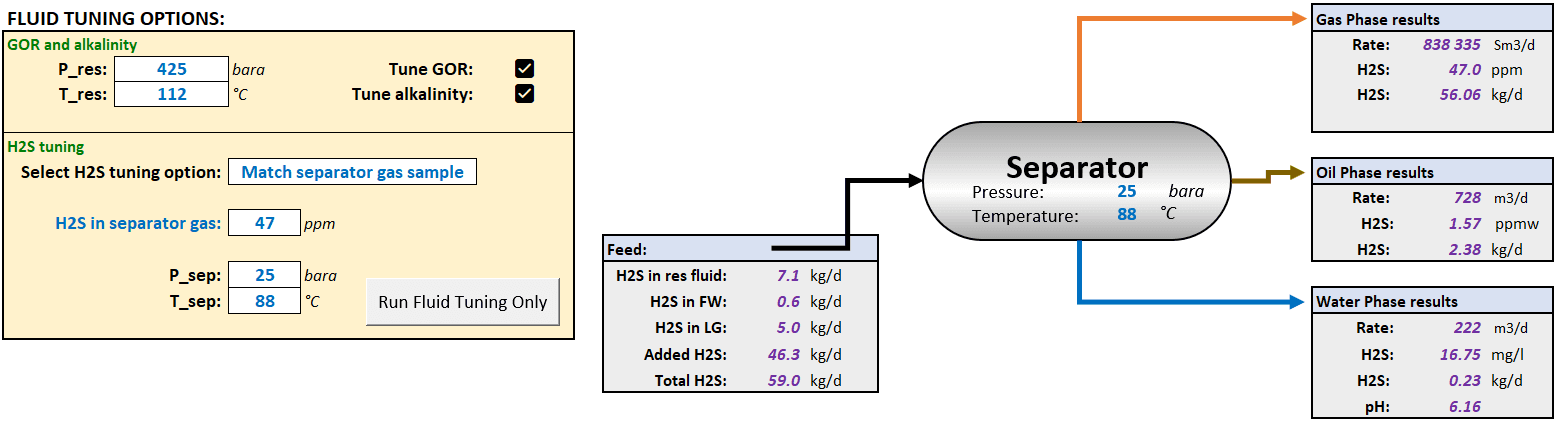
H2S is often a crucial parameter for evaluation of corrosion and adding the correct amount of H2S is important. H2S concentration in a well stream can vary a lot in field with seawater injection due to H2S generating by sulfate reducing bacteria. Measuring H2S in the gas phase, does not automatically tell how much H2S there is in the well stream. In ScaleSimMaterial, there are several H2S tuning option. Below is an example where H2S is measured to 47 ppm in test separator gas when the separator is operating at 25 bar, 88°C. ScaleSimMaterial will then calculate how much H2S there must be in the well stream such that the gas phase concentration match the measured value of 47 ppm and H2S concentration in the other phases are calculated. In the example below, there was some H2S in the reservoir fluid (7.1 kg/d), from the produced water (0.6 kg/d), in the lift gas (5 kg/d). ScaleSimMaterial then added 46.3 kg/d such that the total H2S rate in the well was 59 kg/d. This gives 47 ppm in the gas, 1.57 ppmw in the oil and 16.75 mg/l in the water phase. These H2S concentrations are then included in the whole well calculation. (H2S from the lift gas is added together with the lift gas of course.
Want to try it?
ScaleSim Material is very easy to learn and easy to use. Contact us if you want a demo!