

ScaleSim Base Module
The ScaleSim™ Base Module is a desktop application and the workhorse of the ScaleSim platform. This is where you enter water, oil, and gas analyses, tune your input fluids, and create representative feed streams for your simulations. You can then run calculations for oil and gas wells.
Enter the water analysis and water rate. You may add several different waters to simulate, for example, breakthrough of injected seawater or mixing of different waters.
Enter the reservoir fluid—oil, gas, or both—together with flow rates.
Run tuning to equilibrate the water and the oil. There are several tuning options to automatically:
Make reservoir fluid water-saturated
Saturate water with gas components
Tune alkalinity to calcite saturation, etc.
Tune to sulfate saturation
Tune iron
Run simulations—single-point calculations or various types of profile calculations (see details below).
Load results to Excel. ScaleSim integrates with Excel and allows you to load all results directly to Excel with a click on a button.
Read more about each topic below.
ScaleSim - Water analysis input
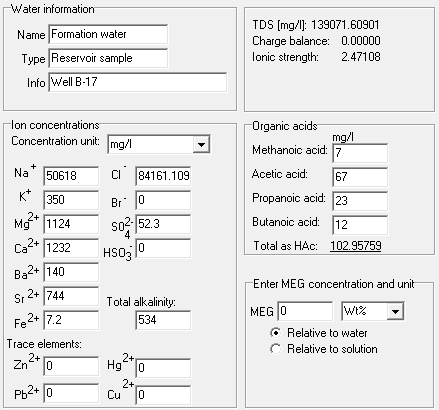
The water analysis is the most important input for calculation of pH and scale risk, and the quality of the simulation results will, of course, rely on the quality of the input data. The ScaleSim water analysis input includes all the ions and components normally found in oil and gas systems. Concentrations can be entered in different units, and ScaleSim will automatically adjust either Na⁺ or Cl⁻ to make your water electro neutral.
Concentrations of dissolved gases like CO₂, H₂S, and methane are normally not measured in water analyses, but ScaleSim can calculate these for you. You can, for example, specify reservoir conditions and composition of the reservoir fluid, and ScaleSim will calculate concentrations of CO₂, H₂S, and methane in your water. Alternatively, you can specify the concentrations directly, or enter pH, and ScaleSim will calculate how much CO₂ there needs to be in the water to obtain the measured pH.
In the water analysis, the user may also create waters or fluids that contain H₂S scavenger, MEG, MDEA, and dissolved oxygen (not shown in picture).
Up to six different waters can be included in a single simulation.
ScaleSim - Oil and gas analysis input
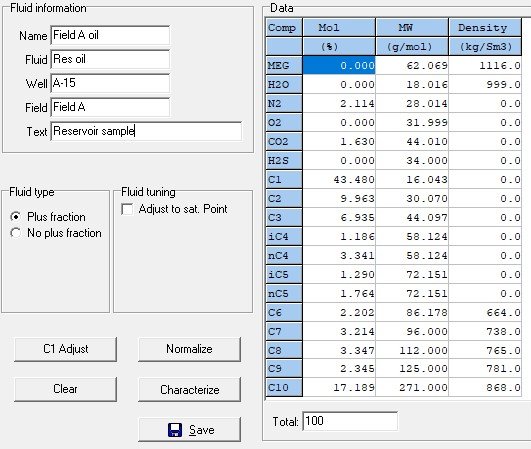
ScaleSim includes a full Equation-of-State (EoS)-based PVT model, similar to those used in leading PVT and process simulation tools. Users can define fluid compositions that include N₂, O₂, CO₂, H₂S, CH₄, and all the normal PVT components up to C₁₀₊. C₆–C₉ components are handled as pseudo-components, and C₁₀₊ can be split into nine pseudo-components covering carbon numbers up to C₈₀ using well-established characterisation procedures. The result is a characterised fluid that gives a very good representation of your reservoir fluid, whether it is a gas, gas-condensate, light oil, or heavy oil.
Both Soave–Redlich–Kwong (SRK) and Peng–Robinson (PR) EoS are supported, with Peneloux volume correction for improved liquid densities and option to use the Huron–Vidal mixing rule. The PVT model in ScaleSim therefore also allows you to use ScaleSim as a pure PVT simulator, providing accurate phase compositions and phase properties.
The PVT module is fully integrated with the water phase model, ensuring complete equilibrium between water and oil/gas phases while solving all multiphase mass balances and equilibria in the well stream.
ScaleSim has unique flexibility with respect to entering oil and gas. The example shows input of a full reservoir fluid composition. If PVT input is based on separator samples or a flashed fluid, it is also possible to enter stock tank oil and gas analyses separately, and ScaleSim will recombine them to generate the combined reservoir fluid. You can also enter a reservoir oil and a gas-cap gas, and simulate how varying amounts of gas-cap gas will influence your scale predictions. Flow rates are normally entered as Sm³/d, but the user can also specify actual volume at a specific pressure/temperature.
After entering an oil or gas analysis, ScaleSim will automatically calculate several properties, such as density and GOR. Inside the oil analysis window, there are also options for automatically adjustment of the fluid input to match a saturation point or a given GOR.
If the well has gas lift, a separate gas can be entered and included in the simulation from the the lift gas injection point.
ScaleSim tuning
Both water analyses and PVT reports are often incomplete and inaccurate. For example:
Amounts of dissolved gases in water are not given
The PVT composition is normally dry (water content not given)
Some ion concentrations may be missing or are wrong
It is reasonable to believe that formation water and reservoir fluids are in equilibrium—they have been in the reservoir for millions of years. The reservoir fluid should therefore be saturated with water, given the water vapour pressure of the formation water. Similarly, the water should be saturated with gas components like CO₂, H₂S, and CH₄ from the reservoir fluid. It is also a common assumption that formation waters are saturated with calcite (CaCO₃) because most reservoir rocks contain some calcite. Further, a formation water should not be supersaturated with any minerals—they would have precipitated.
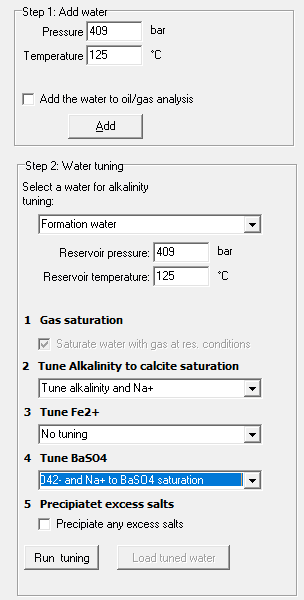
In ScaleSim, you can run various tuning steps and automatically:
Add water to the reservoir fluid to make it water-saturated
Add gas components to the water
Adjust alkalinity to make water calcite-saturated
Adjust iron concentration if the water is supersaturated with either FeS or FeCO₃, or to make it saturated
Adjust either Ba²⁺ or SO₄²⁻ in case water is supersaturated with BaSO₄
Precipitate any excess minerals
The result from the tuning is a formation water and a reservoir fluid that are in equilibrium with each other and with the reservoir rock, and this is the most representative starting point for performing all types of simulations.
ScaleSim - Simulations
Once composition and flow rates are defined, simulations can be performed. ScaleSim offers many different types of simulations:
Single Point – A single calculation at a given P and T.
Profiles – Automatically run pressure and/or temperature profiles from start conditions to end conditions. Both P and T can be varied simultaneously. A typical example is to evaluate the risk of CaCO₃ scale when pressure is reduced.
Mixing Profile – Mix two waters, for example, formation water and seawater, from 0 to 100%. This is the classic simulation to evaluate the risk of sulphate scale with seawater breakthrough.
MultiProfile – With the MultiProfile, P and/or T can be varied independently in several sub-profiles to simulate how scale potential varies along a full well path. The different sub-profiles could represent reservoir → well, well → wellhead, upstream → downstream choke, etc. The MultiProfile calculation also allows for performing pressure-enthalpy (PH) and pressure-entropy (PS) calculations, where ScaleSim will calculate how temperature changes during inflow to a well or due to pressure drop over a valve.
Gas Lift Simulation – This is a profile simulation where a gas stream is added to simulate the effect of lift gas injection.
Constant SR Profile – Perform a detailed well analysis by simulating a scale risk diagram and plotting how the scale risk in the well varies with pressure and temperature.
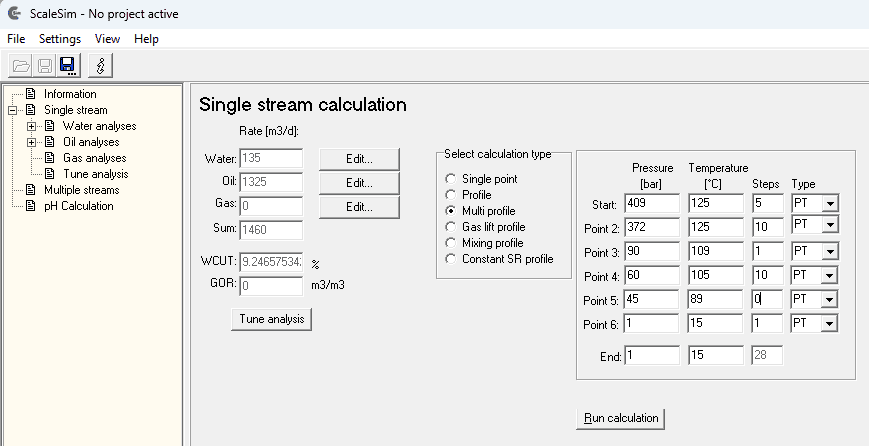
The above input shows an example of a MultiProfile simulations in a well from reservoir to inlet separator. The total simulation is divided into four-sub profiles as follows:
Start in reservoir at 409 bar/125°C and then 5 steps to
Bottom hole at 372 bar / 125°C and then 10 steps to
Wellhead, upstream choke at 90 bar/109°C and then 1 step over choke to
Wellhead, downstream choke at 60 bar/105°C and then 10 steps to
Inlet separator at 45 bar/89°C and then zero steps means that simulation stops here.
In the above simulation, each of the sub-profiles are defined as PT-type simulations. This means that the given pressures and temperatures are used from start to end. The simulation type can be changed to PH (pressure enthalpy) or PS (pressure entropy) profiles. For example, inflow from reservoir to a well (from Start to Point 2) can be modelled as an irreversible adiabatic process meaning that the enthalpy will be constant. If the first profile is set to PH-type, ScaleSim will calculate how the temperature changes due to the Joule-Thomson effect caused by the pressure drop from the reservoir and into the well. Similarly, temperature change over a choke can be calculated by selecting a PH-type profile.
Calculation speed and integration with Excel
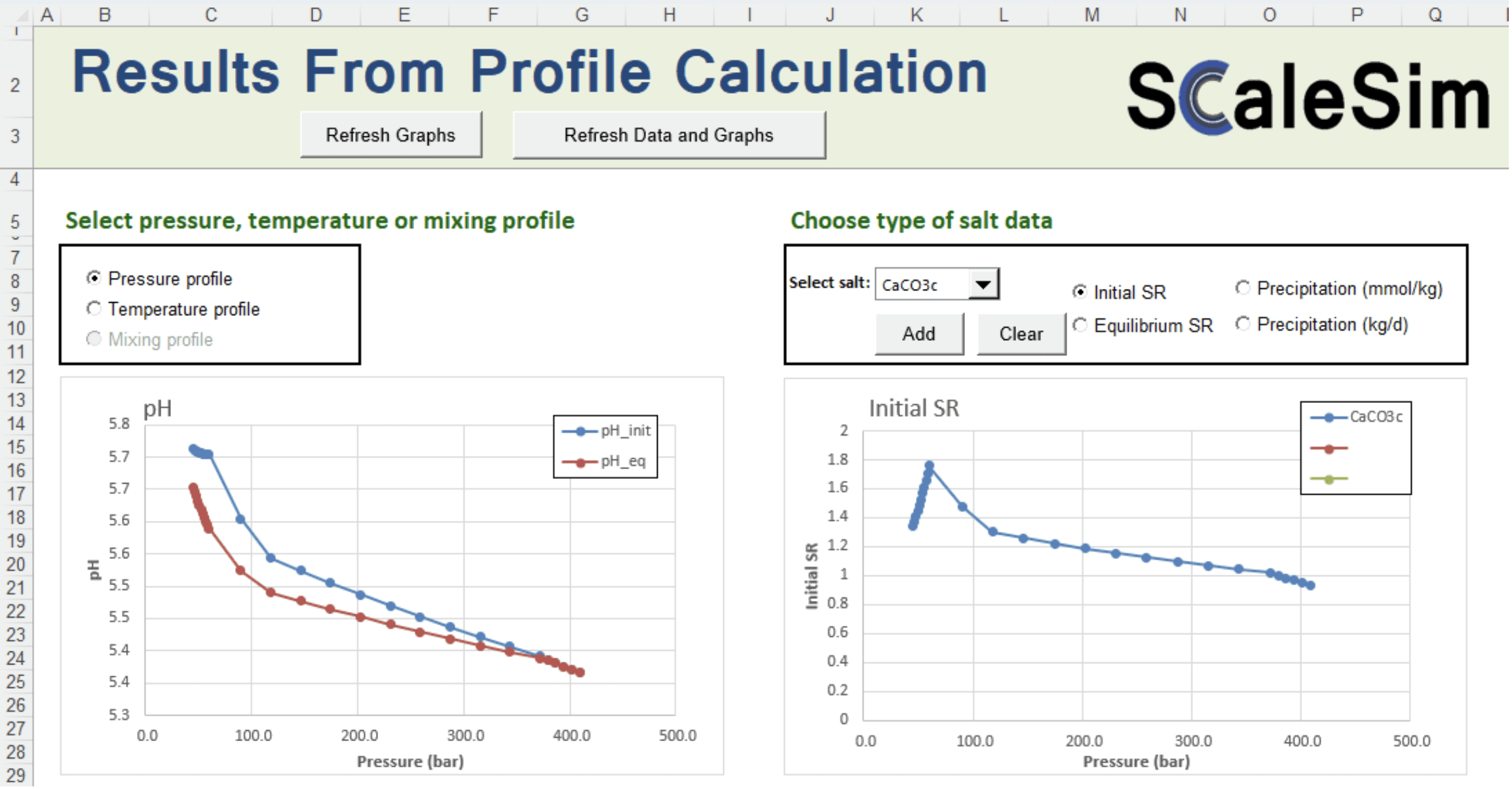
ScaleSim is very fast! Even a complex calculation, such as the MultiProfile shown above with 28 calculation points, runs in less than one second! Results are displayed immediately as text-file tables in the result window. The efficient ScaleSim code therefore allows you to run many simulations, vary parameters, and run again without having to wait for the simulations to complete.
An Excel workbook has been developed where results from simulations can be imported directly. Once the results are in Excel, the user may utilise all the Excel functionality for further calculations and for creating result tables and graphs. Several pre-defined graphs are available.
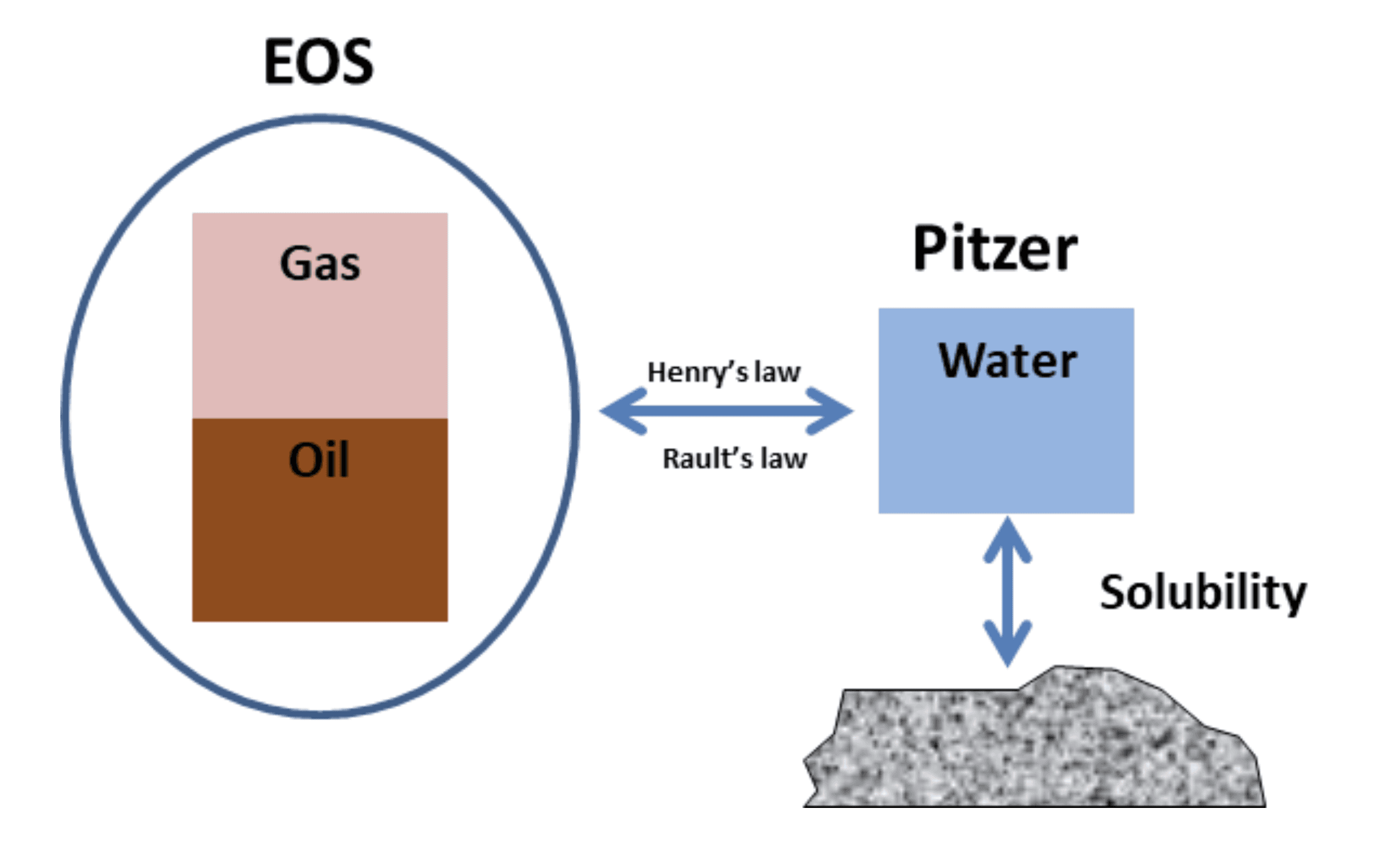
The Scalesim Thermodynamic model
ScaleSim combines the best from two worlds, an Equation-of-State based PVT model and a water model using the Pitzer model and combines these models using classical thermodynamic laws such as Henry’s and Rault’s law.
The EOS model is used to calculate phase compositions and properties of the oil-gas phases. This includes calculation of bubble/dew-point, GOR, phase densities, composition and fugacities.
The Pitzer model is used to calculate non-ideal behaviour of the water phase (activity coefficients) and this is combined with a classical aqueous equilibrium model that includes dissociation of CO2, H2S and organic acids, pH calculation and mineral solubility calculations.
The ScaleSim model includes all the components normally found in oils and gases and oilfield waters. This includs all the normal hydrocarbon compnents N2. CO2, H2S, O2, CH4, ethane, propene etc. up to C10+ and all normal water compnents like Na+, K+, Ca2+, Ba2+, Sr2+, Fe2+, Cl-, SO42-, organic acids (Formic-Butanoic) and aqoueous CO2 and H2S and their dissociation species. 27 differnet solids are included in the model, among these all the common scale minerals such as CaCO3, BaSO4, SrSO4, CaSO4, FeCO3, FeS, PbS, ZnS, NaCl and several others.
A large amount of experimental data from the litereature and also unpublished data have been used to develop temperature and pressure correlations for all the thermodynamic variables such as equilibrium constants and parameters in the Pitzer model and the EOS model. This ensures that calculations are accurate over a wide range of pressure, temperature and compositions.
ScaleSim can be used from 0-3000 bar and 0-300°C, but amount of experimental data above 2000 bar and 250°C to verify the accuracy is of course very limited.