
ScaleSimPro – A unique process simulator
ScaleSimPro lets you calculate scale potentials throughout a complete topside process, including separators, heaters, scrubbers, pumps, etc. Streams generated by ScaleSim can be loaded into ScaleSimPro and then used as feed streams to the process simulation.
The rate/volume of streams can be adjusted freely, making it very easy to simulate the effect of varying contributions from different wells, varying water cut, varying lift gas rates, etc., and how this influences scale potentials, amount of scale that can form, pH, and composition of streams. Pressures, temperatures, water carry over and other conditions and factors can of course also be varied to simulate different scenarios in a topside process.
ScaleSimPro uses Excel as its user interface. This means that it is very easy to change the input data—you simply modify the contents of input cells. All the results from the simulations are automatically written back to tables in dedicated sheets (one for each simulation unit), and it is therefore straightforward to set up result tables or graphs. If the input data changes, the result tables are automatically updated.
ScaleSimPro can also run scenario calculations, where the input data are automatically varied. For example, by entering a production profile, ScaleSimPro can automatically vary flow rates and conditions according to the profile.
ScaleSimPro uses the exact same thermodynamic/chemical model as ScaleSim.
ScaleSimPro - Process setup
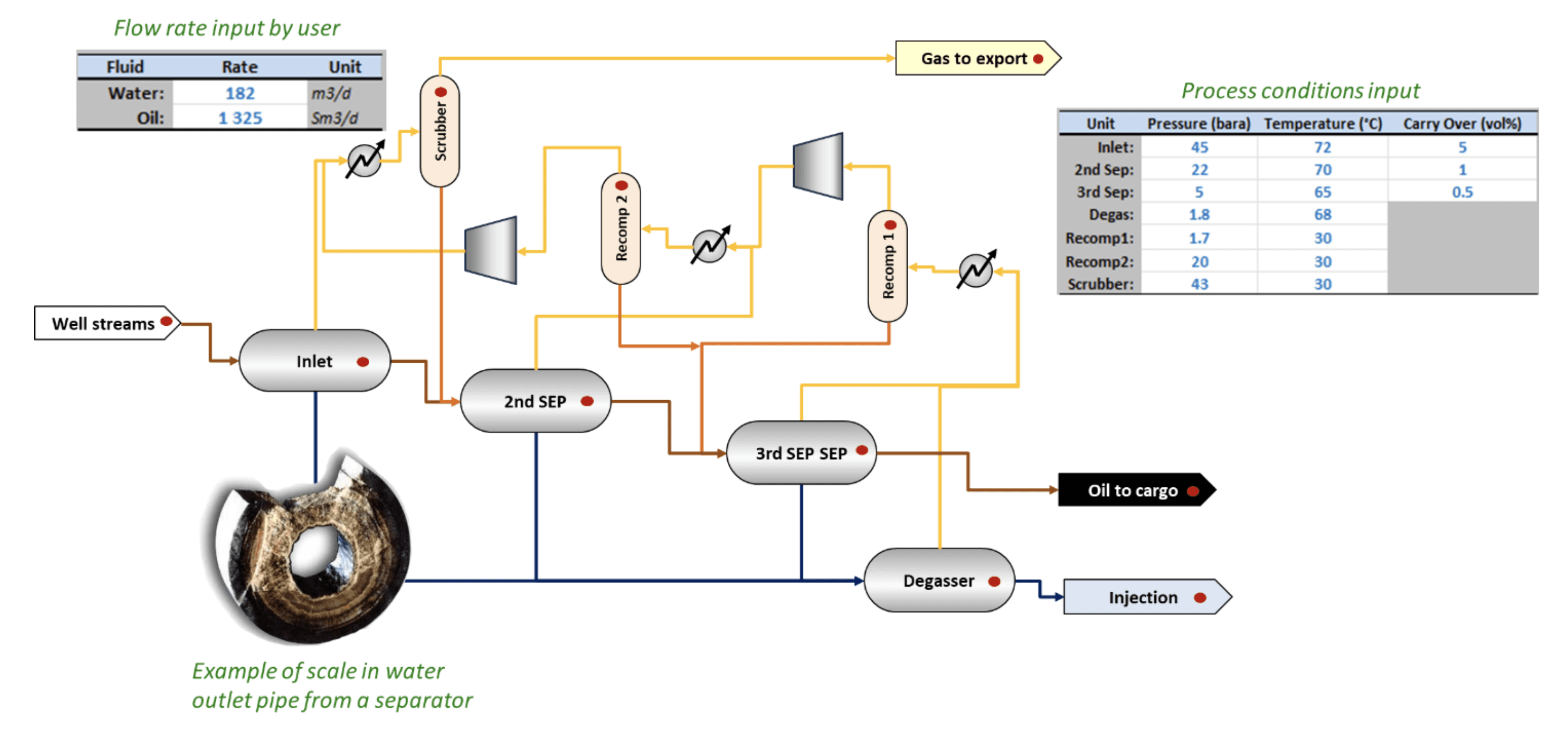
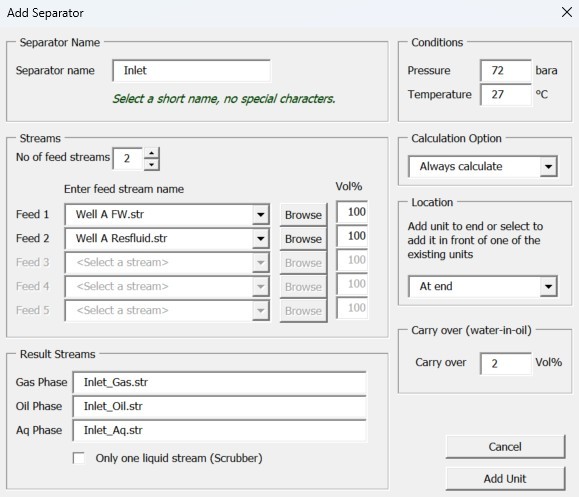
Wizards help you to set up the process by adding one unit at a time. Choose a name of the unit and select feed stream(s) to the unit from available streams in the project. Set pressure and temperature, and add the unit.
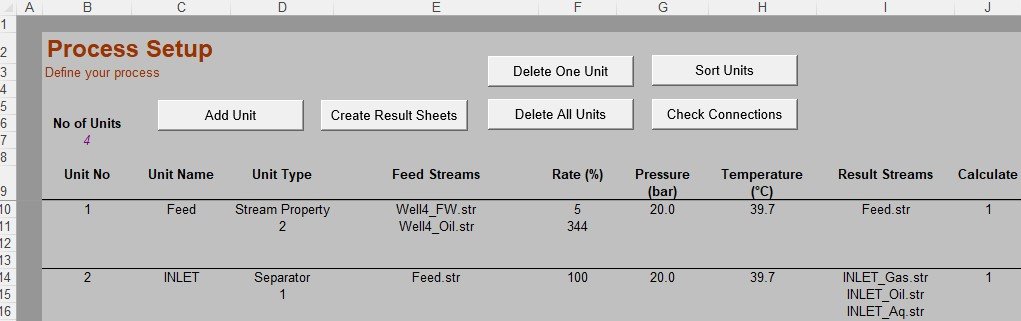
The process setup is then written into an Excel sheet that defines each unit in the process. The setup is very flexible, and you can easily modify all input data such as feed streams, pressures, temperatures, and flowrates. All the input data, such as pressures, temperatures, and flow rates, can also be set by linking the input cells to other cells in the Excel workbook. In this way, you can extract input data from a production profile and easily run through many different cases.
All the Excel functionality is available in ScaleSimPro. This means that you can add formulas that can dynamically modify the process, for example, by calculating feed rates, carry-over rates, temperatures, etc., based on results from the previous calculations. This makes ScaleSimPro extremely flexible and powerful.
ScaleSimPro - Scenarios
With ScaleSimPro, you can set up scenarios to automatically vary input parameters. For example, if you copy a production profile into your ScaleSimPro Excel workbook, you can extract data such as pressures, temperatures, oil, gas, and water rates for different wells at different times, and then run the simulation of the topside process and calculate pH, scale potentials, water volumes, concentrations, scale mass, etc., at all locations in the topside process. You can then automatically run through the simulations for as many points along the profile as you want.
A “process” does not have to be a topside process. It is also possible to simulate a single well by defining the "process" as calculation points starting in the reservoir, then downhole, wellhead etc. all the way up to the topside facility.
The figures show example of:
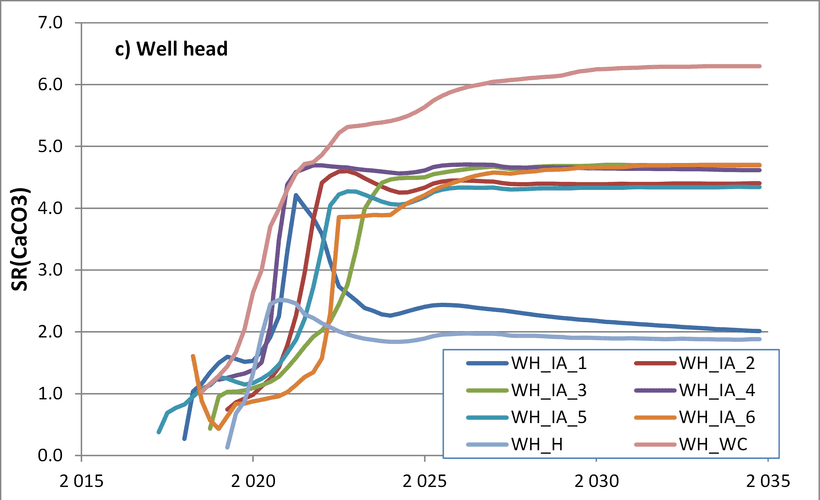
Variation in scale potential for CaCO3 at the wellhead for several wells as function of time (years). Simulations show that some of the wells will have a rapid increase in scale potential after water breakthrough.
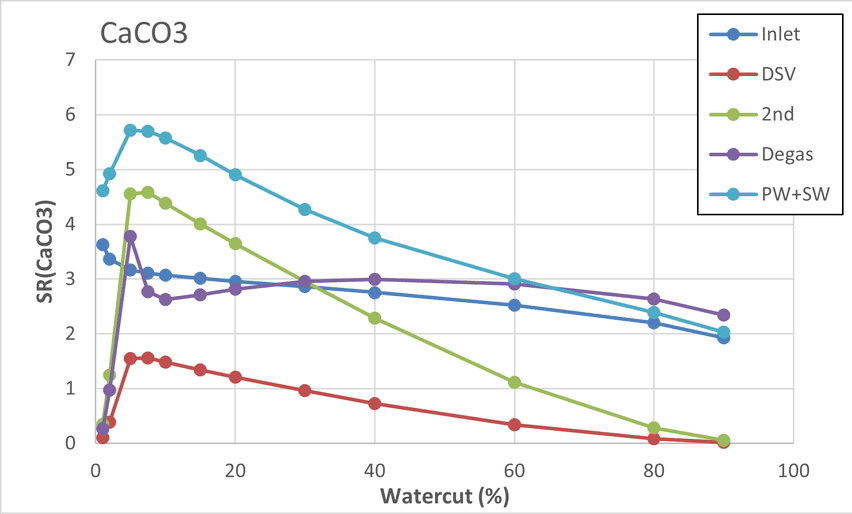
Variation in scale potential for CaCO3 at different locations in a topside process when water cut is varied.
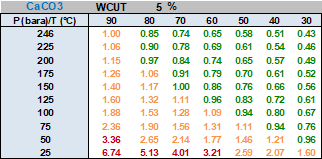
A contour table, where P and T have been varied systematically to map how SR(CaCO3) varies with P and T (contour plot).